

On May 7, 2026, we tested AI vision models on three OCR-heavy tasks: extracting a quote, turning a receipt into JSON, and converting a screenshot table into CSV. The short answer: in that test, Gemini 3.1 Pro Preview and GPT-5.5 were the safest top picks.
Note: these are results from that test date. Google shut down Gemini 3.1 Flash Lite Preview on May 25, 2026; its stable replacement and newer models released since have not been run through the same test.
Update, October 8, 2026: newer models are now available, including OpenAI GPT-6 Astra and GPT-6.1 Sol, Claude Opus 5.5, Grok 4.7, and Gemini 3.8 Flash and 3.5 Flash-Lite. Gemini 3.1 Pro is still in preview. The scores below are from the May test and were not rerun.
Quick answer
- Joint winners: Gemini 3.1 Pro Preview and GPT-5.5 passed all three tasks cleanly.
- Gemini 3 Flash Preview passed all three tasks, but its receipt JSON needed light cleanup.
- Claude Opus 4.7 passed the API retest, but its receipt JSON also needed cleanup.
- Grok 4.20 read the data correctly, but added extra wording on the quote task.
- Gemini 3.1 Flash Lite Preview is fast and capable, but failed strict CSV formatting on the table task.
Executive summary: scores and ranking
| Rank | Model | Score |
|---|---|---|
| Joint #1 | Gemini 3.1 Pro Preview | 10/10 |
| Joint #1 | GPT-5.5 | 10/10 |
| #2 | Gemini 3 Flash Preview | 9/10 |
| #3 | Claude Opus 4.7 | 8.5/10 |
| #4 | Grok 4.20 | 8/10 |
| #5 | Gemini 3.1 Flash Lite Preview | 7/10 |
Test setup
The comparison used three practical tasks that matter for spreadsheet-ready extraction.
- Quote extraction: return only the Steve Jobs quote from an image.
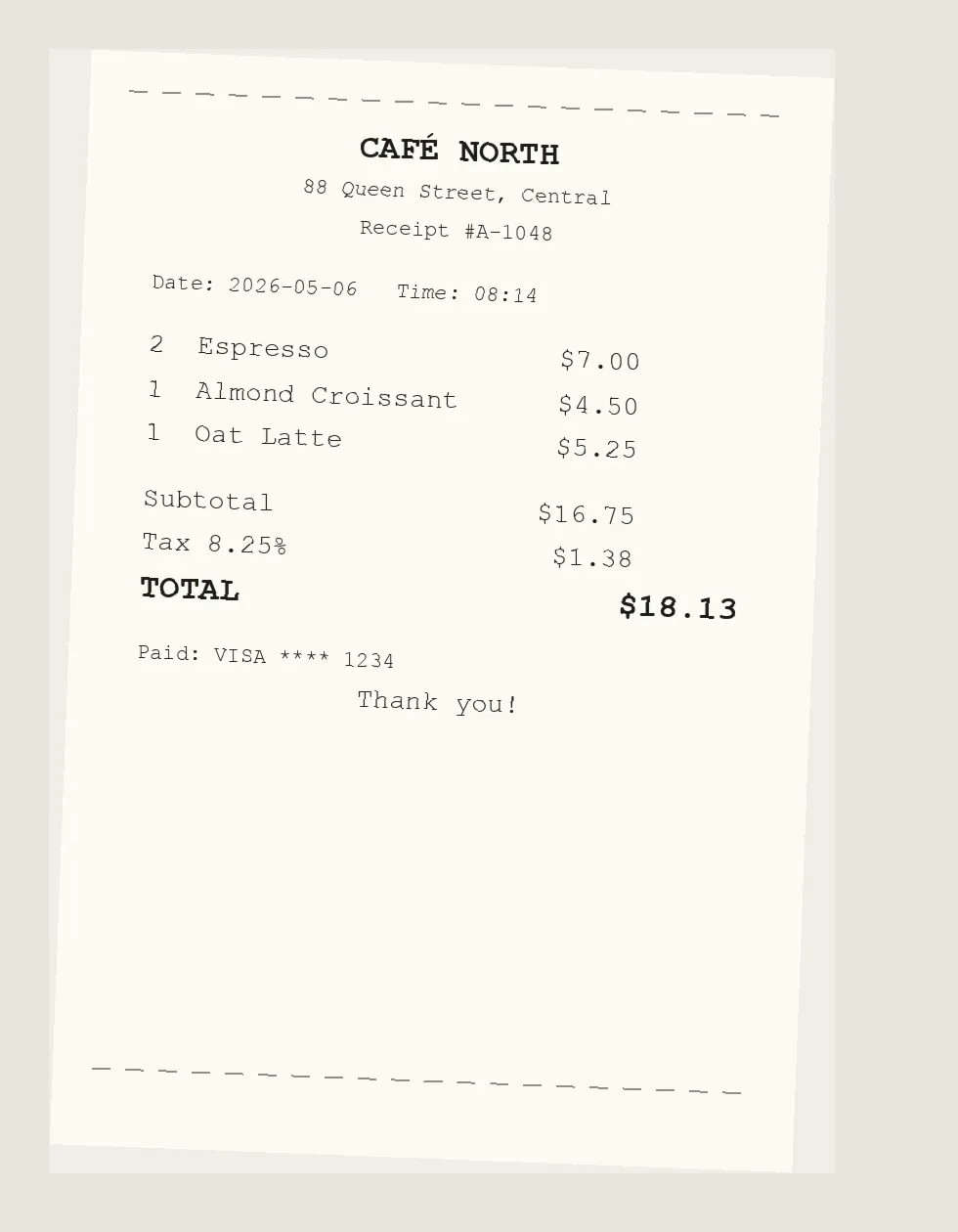
- Receipt extraction: return vendor, date, items, subtotal, tax, total, and payment_last4 as JSON.
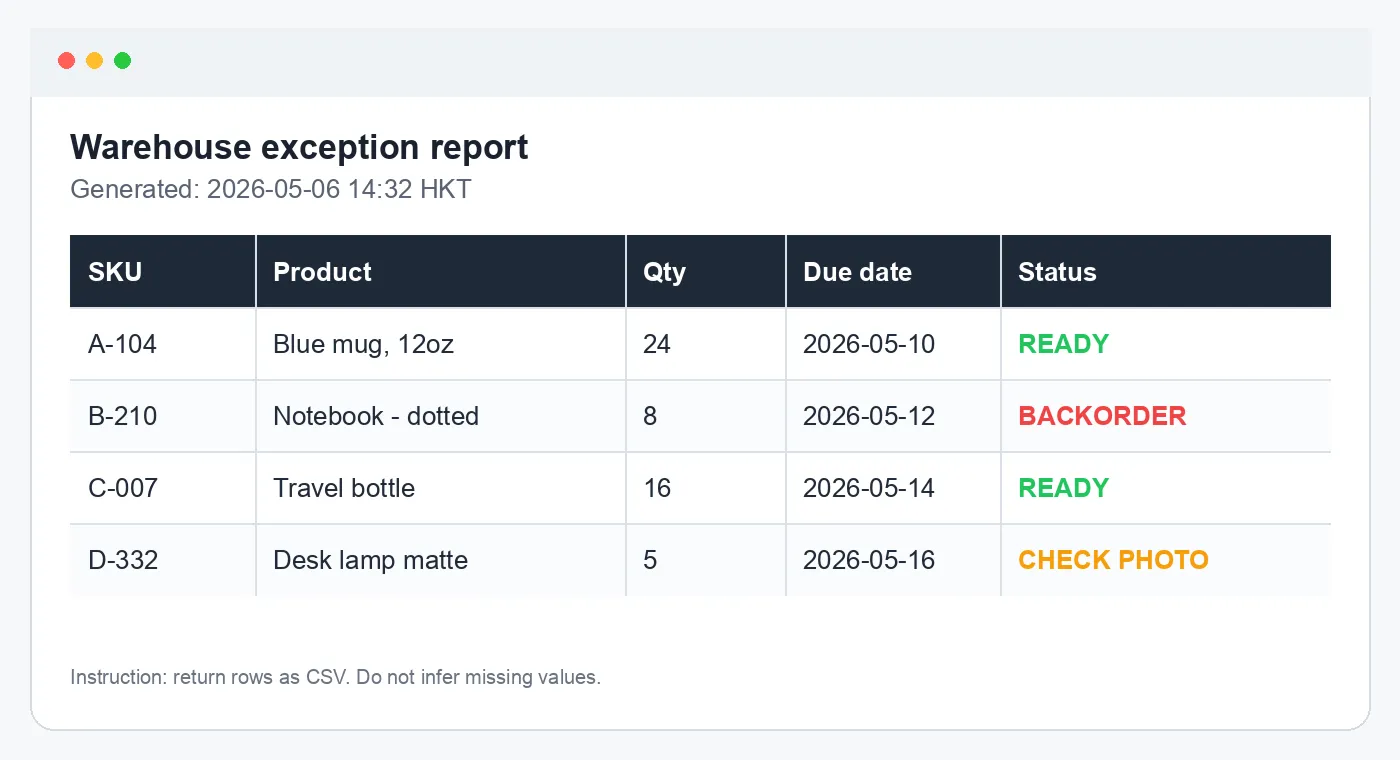
- Table extraction: convert a warehouse exception report screenshot into CSV.
OCR test images

Result details
| Model | Quote | Receipt JSON | Table CSV |
|---|---|---|---|
| Gemini 3.1 Pro Preview | Passed | Passed | Passed |
| GPT-5.5 | Passed | Passed | Passed |
| Gemini 3 Flash Preview | Passed | Passed, but wrapped JSON in code fences and used description instead of name | Passed |
| Claude Opus 4.7 | Passed | Passed, but wrapped JSON in code fences and used description instead of name | Passed |
| Grok 4.20 | Read quote, but added labels and commentary | Passed | Passed |
| Gemini 3.1 Flash Lite Preview | Passed | Passed, but wrapped JSON in code fences | Failed strict CSV because Blue mug, 12oz was not quoted |
Receipt JSON output
The correct receipt output is:
{
  "vendor": "CAFÉ NORTH",
  "date": "2026-05-06",
  "time": "08:14",
  "items": [
    { "quantity": 2, "name": "Espresso", "price": 7.00 },
    { "quantity": 1, "name": "Almond Croissant", "price": 4.50 },
    { "quantity": 1, "name": "Oat Latte", "price": 5.25 }
  ],
  "subtotal": 16.75,
  "tax": 1.38,
  "total": 18.13,
  "payment_last4": "1234"
}
Table CSV output
The correct table output is:
SKU,Product,Qty,Due date,Status
A-104,"Blue mug, 12oz",24,2026-05-10,READY
B-210,Notebook - dotted,8,2026-05-12,BACKORDER
C-007,Travel bottle,16,2026-05-14,READY
D-332,Desk lamp matte,5,2026-05-16,CHECK PHOTO
Which model should you use in AI for Sheets?
You don't need to pick one. AI for Sheets chooses the model for you. Use =VISION() for a few images, or the sidebar's Bulk › Read images task for a whole column. Either way, ask for an exact output format and spot-check a few rows.
=VISION("Extract the text exactly and return JSON with fields: vendor, date, total", A2)Final verdict
Gemini 3.1 Pro Preview and GPT-5.5 are joint winners because both passed every task cleanly.
Gemini 3 Flash Preview is the best lower-friction Gemini alternative from this retest. Claude Opus 4.7 also passed when each image was sent separately, so its earlier issue was image context handling rather than OCR ability. Grok 4.20 and Gemini 3.1 Flash Lite Preview are usable with validation.
Frequently Asked Questions
Which model won this AI vision test?
Gemini 3.1 Pro Preview and GPT-5.5 share first place. Both passed the quote image, receipt JSON, and table CSV tasks cleanly.
How did Gemini 3 Flash Preview perform?
It passed the quote, receipt, and table tasks. The only issue was receipt formatting: it wrapped JSON in code fences and used description instead of name for item fields.
Did Claude Opus 4.7 really fail?
It failed the earlier multi-turn image-context flow, but passed when each image was sent separately through the API. That means the issue was context handling, not raw OCR ability.
Why not rank only by OCR accuracy?
Because real workflows also need clean formatting, reliable attachment handling, and structured output that can go straight into a spreadsheet.