
AI for Docs features
Turn audio into meeting minutes, transcripts, or SRT subtitles directly inside Google Docs.
Meeting minutes
Get a structured summary with decisions, action items, and notes.
Transcript
Transcribe audio to text with optional timestamps and speaker labels.
SRT subtitles
Generate valid SRT subtitle text for video and social clips.
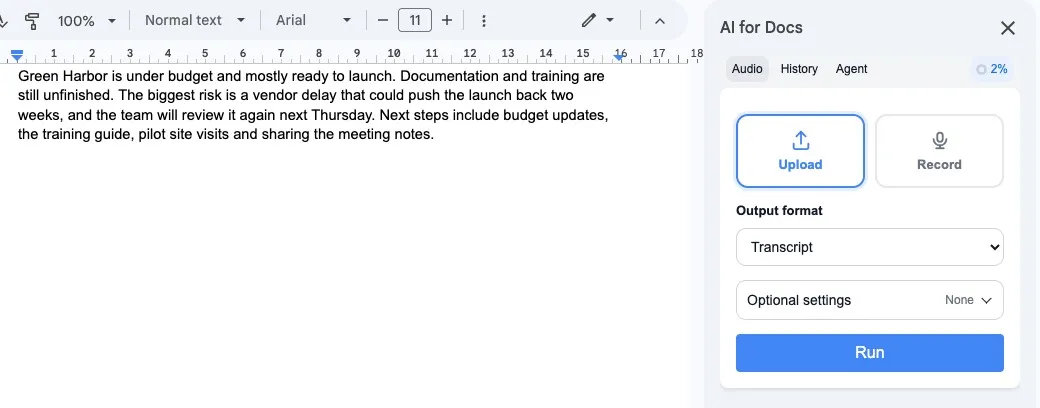
Audio to Text in the Docs sidebar
Upload an audio or video file, or record audio. Then choose an output and insert the result into your document.
- ✓Minutes, transcript, and SRT templates
- ✓Optional timestamps and speaker labels
- ✓Inserts into the current Google Doc
Want step-by-step product instructions? Read Audio to text. If you are starting with an existing recording, follow the Google Docs audio transcription guide.
Which output should I choose?
Pick a template based on what you need to share.
Meeting minutes
Best for teams. Structured sections and action items by default.
- ✓Summary, decisions, action items, notes
- ✓Formatted headings when inserted
- ✓Designed to avoid invented details
Transcript
Best for reviewing exact wording or searching later.
- ✓Clean text output
- ✓Optional speaker labels
- ✓Optional timestamps
SRT subtitles
Best for video. Generates valid subtitle text you can export.
- ✓Valid SRT format
- ✓Timestamped segments
- ✓No extra explanation added